Andreas / Personal portfolio

Things I’ve built.
Problems I’ve solved.

A collection of my automations and apps, with the thinking behind each build, the tools involved, and where the work stands today.

Explore the projects

The collection

4 projects / More to come

Project 01

Jira Weekly Reporting Automation

Implemented
Date
October 2022 – February 2024, based on project history and the latest saved build.
Completion status
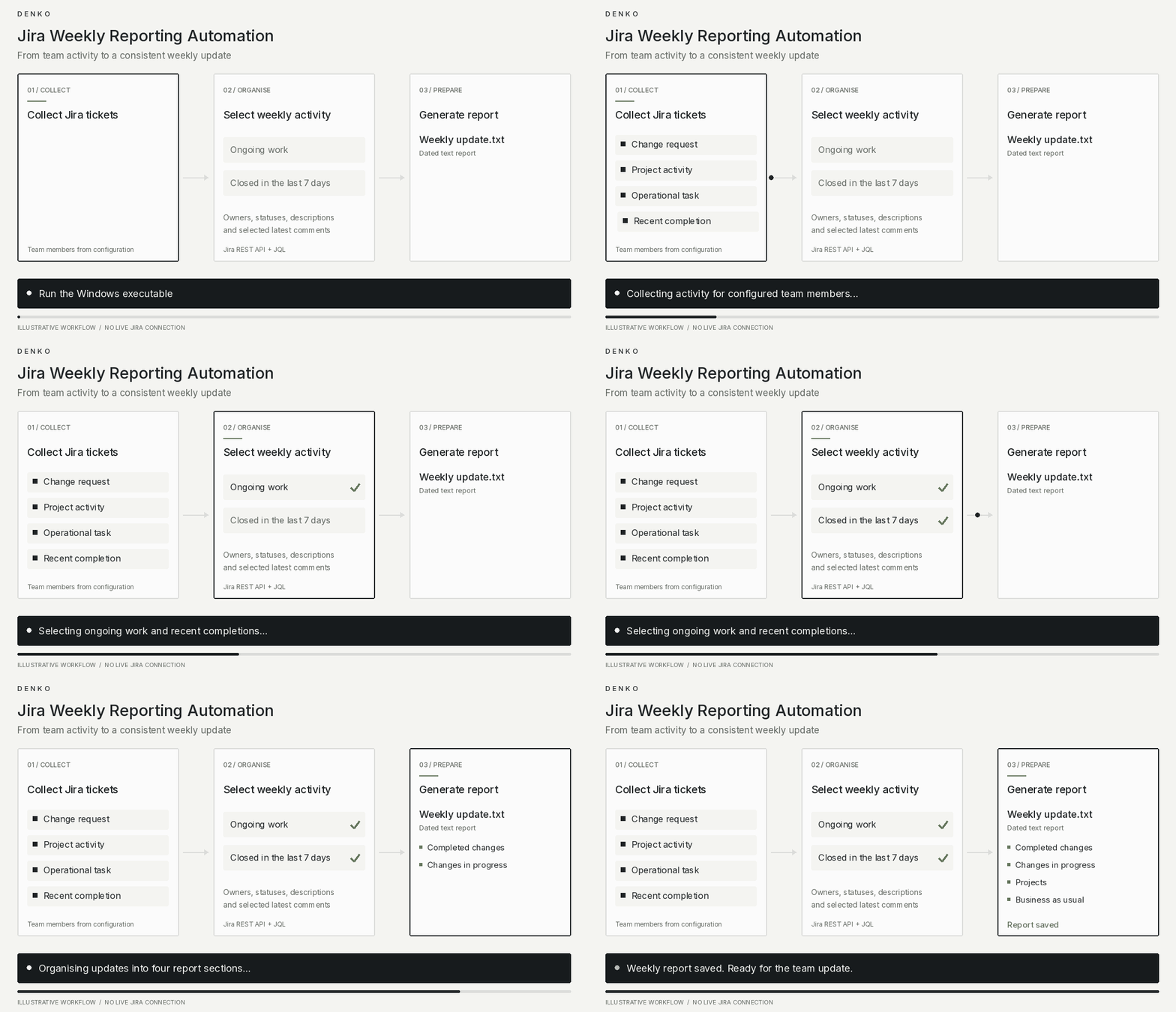
Implemented and packaged as a Windows executable, with generated reports saved in the project. Current Jira connectivity has not been verified.
Project animationGIF demo

See the automation in action.

Problem to solve

Preparing weekly team updates required manually reviewing Jira tickets and compiling progress across projects, operational tasks, and change requests. This tool automates that collection and produces a consistent report.

Thought process — how I approached it

The approach was to turn Jira activity into a report that follows how the team discusses its work. The tool retrieves tickets for configured team members, captures ongoing work and items closed within the previous seven days, and groups them into completed changes, changes in progress, projects, and business-as-usual tasks. It includes owners, statuses, descriptions, and selected latest comments, then exports a dated text report. Packaging it as a Windows executable makes it easier to run without a separate Python installation.

Applications used

  • Python
  • Jira Cloud REST API
  • JQL
  • Requests
  • JSON configuration
  • PyInstaller

Earlier versions also included HTML reports and Gmail/email experiments.

AI used — tools and how they helped

No AI integration or documented AI development assistance was found in the code. Any use of ChatGPT, Copilot, or another assistant during development has not been confirmed.
Project 02

ServiceNow-to-Jira Change Request Synchronisation

Implemented
Date
October 2022
Completion status
Core integration implemented and tested. Hosted in AWS as a lambda function with a scheduled trigger.
Project animationGIF demo

See the automation in action.

Overview

A Python automation that brings ServiceNow change requests into Jira and keeps their workflow statuses aligned. It helps technical operations teams track work across both platforms with less duplicate administration.

Problem to solve

When changes are managed in ServiceNow but team activity is tracked in Jira, maintaining both systems creates extra work. Details must be copied, records linked and statuses updated manually.

Thought process — how I approached it

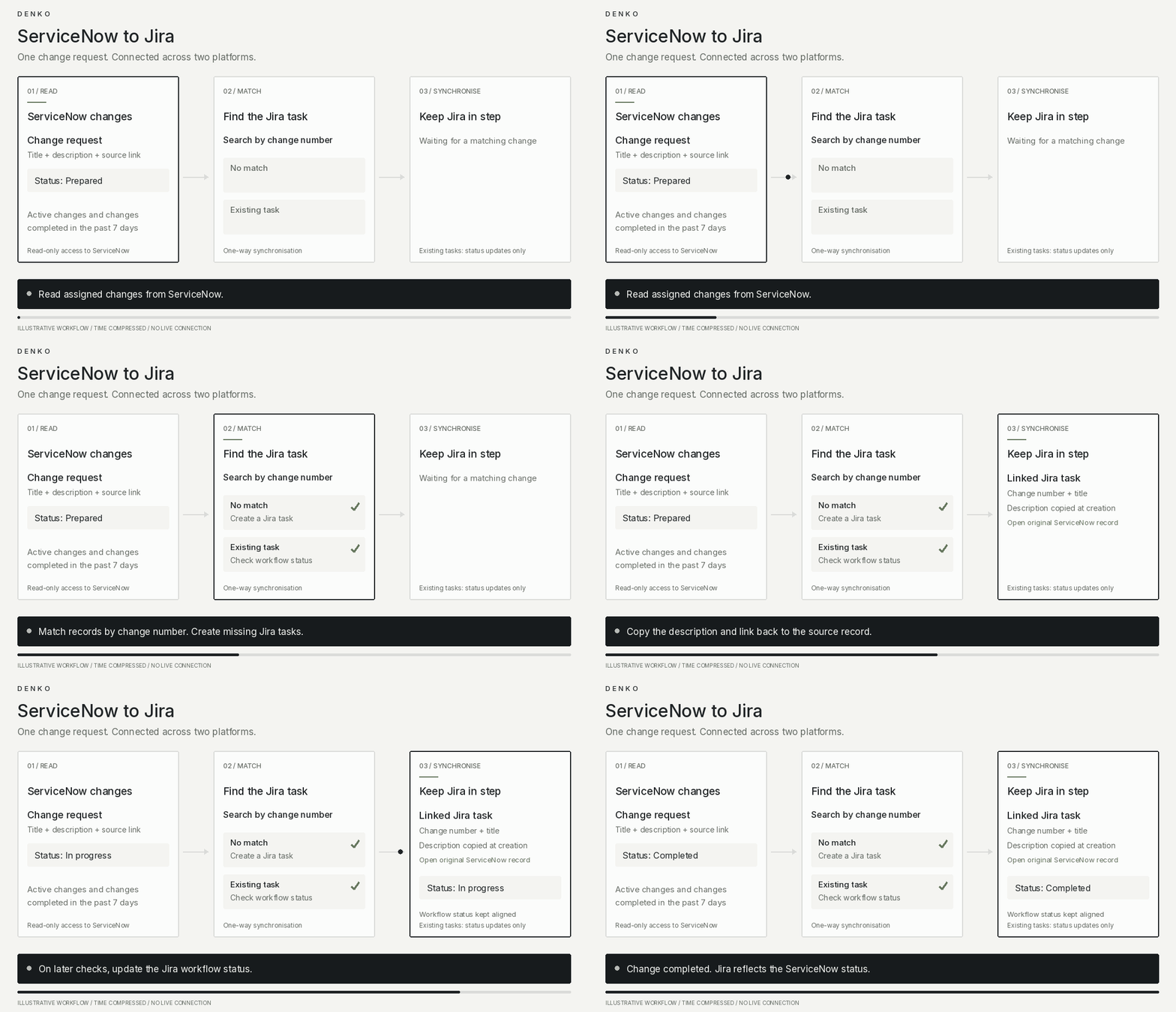
The approach keeps ServiceNow as the source of truth and uses each change number to connect records across the two platforms. Missing Jira tasks are created automatically, while existing tasks receive workflow status updates.

Separating the platform connections from the main workflow makes the integration easier to understand and maintain.

How it works

  1. Retrieves assigned ServiceNow changes that are active or were completed within the previous seven days.
  2. Searches Jira for the corresponding change number.
  3. Creates missing Jira tasks with a description and link to the original ServiceNow record.
  4. Updates Jira workflow statuses as the source changes progress.
  5. Repeats the check periodically.

The integration runs one way—from ServiceNow to Jira. Existing Jira tasks receive status updates; their descriptions and other details are not continually synchronised.

Applications used

  • Python
  • ServiceNow Table API
  • Jira REST API
  • JQL
  • Requests
  • JSON configuration

AI used — tools and how they helped

No AI-powered functionality is present. AI assistance during the original development has not been confirmed.

Benefits

Reduces repeated ticket entry, helps keep change statuses consistent and gives team members a direct link to the original record. Time savings have not been measured.

Project 03

SEO Ranking Monitor and Webpage Archive

Developed prototype
Date
February 2026
Completion status
Developed prototype with evidence of historical collection runs.
Project animationGIF demo

See the automation in action.

Overview

Think4 brings search-result collection, historical records and ranking comparisons into one workflow. It is designed to help businesses and marketing teams explore local search visibility and competitor rankings over time.

Problem to solve

Monitoring search visibility manually means repeating searches, recording positions, visiting websites and comparing results with earlier observations. As the number of services and locations grows, this becomes difficult to maintain consistently.

Thought process — how I approached it

The approach separates collection from analysis. A Python collector gathers search results and saves webpage HTML, while a database retains timestamped ranking observations for the dashboard.

Keeping historical records makes comparisons possible across collection runs, rather than relying on the latest search alone.

How it works

  1. Loads configured searches combining service categories and Australian locations.
  2. Retrieves organic Google results through the Serper API.
  3. Retains the first result for each domain and records its search position.
  4. Stores timestamped observations in MySQL and downloads webpage HTML separately.
  5. Provides dashboard filters, ranking charts, movement comparisons and trend views.

The dashboard reads database history. Saved HTML captures support separate inspection; they are not complete offline copies of websites.

Applications used

  • Python
  • Serper API
  • Requests
  • MySQL
  • PHP
  • JavaScript
  • Chart.js
  • JSON
  • Git
  • GitHub

AI used — tools and how they helped

No AI-powered functionality is present. The dashboard uses conventional statistical calculations for trends. AI assistance during development has been confirmed.

Results and benefits

The project supports 63 configured searches and preserves historical search results and saved webpage files. It demonstrates a repeatable approach to collecting search observations and comparing visibility over time.

Potential benefits include less manual recordkeeping and easier ranking comparisons. Time savings and commercial outcomes have not been measured.

Project 04

Net Explorer V2 — Network Discovery and Infrastructure Documentation

Working prototype
Date
October 2026
Completion status
Working prototype with packaged distributions, saved drawing exports and historical automated test results. Broader validation across physical network devices remains in progress.
Project animationGIF demo

See the automation in action.

Overview

Net Explorer brings network discovery, topology drawings and physical infrastructure documentation into one browser workspace.

It helps engineers understand device connections, inspect supported network protocols, and document equipment across geographic locations, rooms, racks and cabinets.

Problem to solve

Network documentation often involves collecting information from individual devices and copying it into separate diagrams, spreadsheets and equipment records.

These documents can become inconsistent as networks change, making troubleshooting and handover more difficult.

Thought process — how I approached it

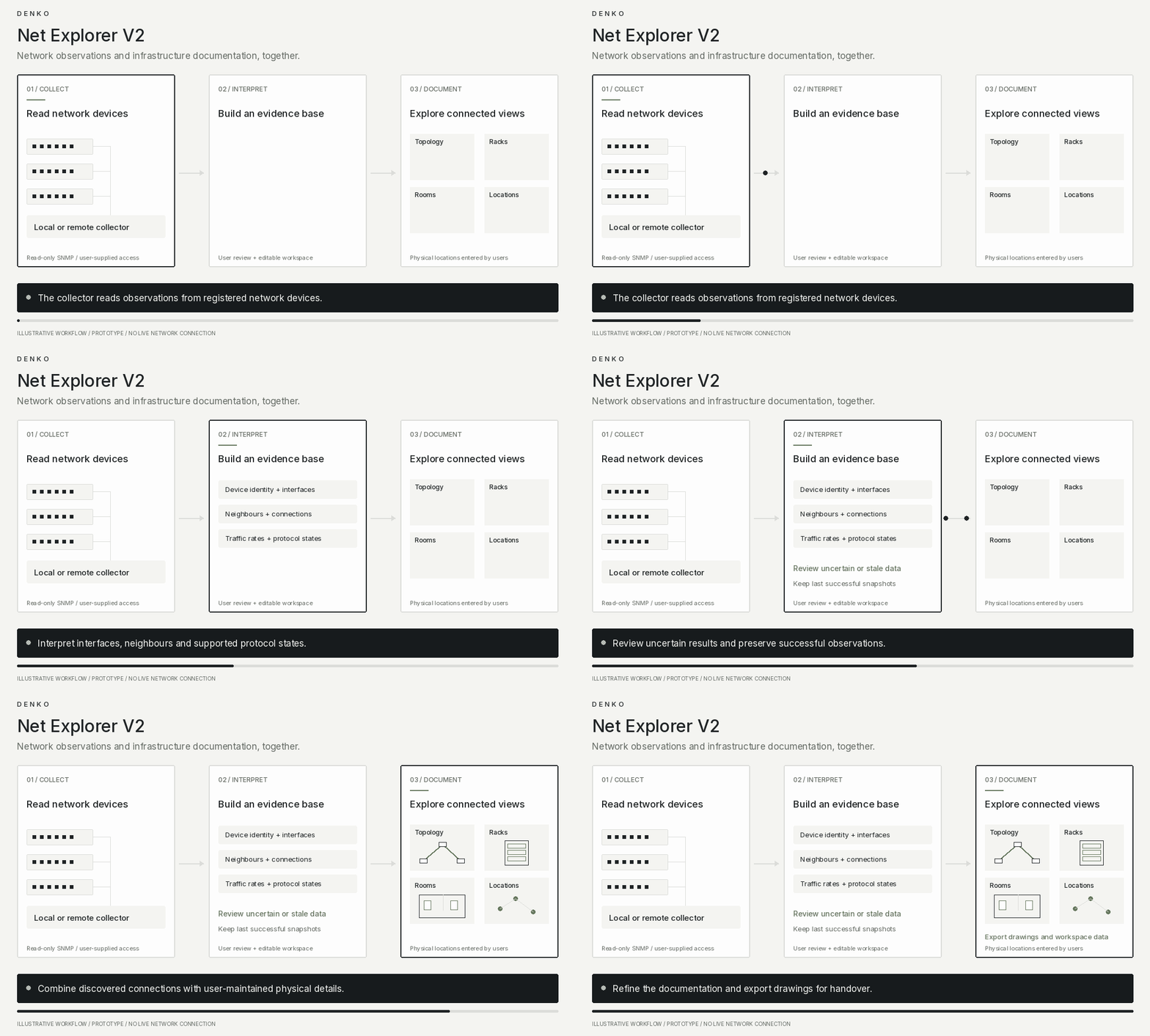
The approach combines repeatable network observations with editable documentation. A collector gathers device information, while users review discovered connections, arrange drawings and add physical details.

Uncertain results remain visible for review. Failed polls retain the last successful snapshot, with stale information labelled.

How it works

  1. Connects the browser workspace to a local or remote collector.
  2. Registers network devices and configures read-only SNMP access.
  3. Collects device identities, interfaces, neighbours, traffic counters and supported protocol information.
  4. Interprets observations to build topology and protocol views.
  5. Combines discovered information with user-maintained locations, racks and room layouts.
  6. Exports drawings and workspace data for documentation and handover.

Supported views include Spanning Tree, HSRP, OSPF and EtherChannel. Export formats include SVG, PNG, DXF and diagrams.net.

Applications used

  • Node.js
  • JavaScript
  • Express
  • HTML
  • CSS
  • SNMP
  • Leaflet
  • OpenStreetMap
  • JSON storage
  • Custom drawing exporters

Testing tools include the Node test runner, jsdom, Playwright and GNS3.

AI used — tools and how they helped

No AI-powered functionality is integrated. Discovery and protocol interpretation use network observations and explicit rules. AI assistance during development has not been confirmed.
Results and benefits

Saved workspaces, drawings, exports and test records demonstrate the prototype’s collection and documentation capabilities.

The practical benefit is less repeated transcription and a shared workspace for logical connections and physical infrastructure. Time savings and production-scale performance have not been measured.

Your next step

Have a task worth simplifying?

Bring the task you keep repeating. We’ll work out a better way to get it done.

Start a conversation